Oh well, another year to try to excell in

FriDay September 25, 2014

Friday, September 26, 2014


"More on Cricut Print then Cut"

I have been playing with "Print then Cut" function of Cricut Design Space.
The more I play with it, the more I like it. The big thing is that Provocraft
seems to be hinting that more improvements are in the works. I sure hope
so.

So, yesterday I tried to really given the Print then Cut update a real work
out. So far I have tried out various variations of printing then cutting images
contained in the image gallery and cartridges that I have purchased. When
the image prints out it has a heavy border around the image. Very
disconcerting to start, but, the heavy border is to allow the Cricut Explore
To cut close to the actual image.

The Halloween card shown below was made with the Print the Cut function.
The only item that had me worried was the spider web. It looked like one big
blob of black, but as you can see it cut out alright.

The other items were also cut with the Print then Cut function. The two that
are colored were from cartridges I have. The image of the girl with the
ruffled dress is a digital image that I bought and downloaded. Think of the
possibilities. You could size the image to the correct size, then print the item from Design Space then color it with your favorite coloring medium, mine is Copic markers. Then when you are
satisfied with it, put it on the mat and cut the colored image out. Walla, you
have a perfectly colored image that is cut and ready to use on a card. And,
no hand cutting. Yay!!!!
"Examples of "Print then Cut"
 
 
They have also improved the weld function and added a slice function, which is normally only found on the high end software.
 
Okay, so I guess that's about all for today. If you have any questions, leave it as a comment and I'll answer back.
 
Have a GREAT DAY!!!!
 
 
Bob L.


Wednesday, September 24, 2014

"Review of The Print then Cut function on The Cricut Explore"
 
Provocraft finally released the update for the "Cricut Explore Design Space" Print then Cut function.
 
I have one thing to say "WOW". I have been playing with in all morning and love it. Thank You Provocraft, finally a real advance in how we can use the machine. The Explore with the Design Space software update were well worth the purchase of the "Cricut Explore".
 
 
There are a few thing to do with the new "Print then Cut" function, but the most important is;
 
"Take your time with the Calibration"
 
I had to do the calibration three times before I was satisfied with it. The calibration is very important because this determines how the Explore cut out the image the it printed on your printer. If you do the calibration properly, the cut on the Explore will be just inside of the colored portion of the image that you printed.
 
If you want to see how the Print then Cut works, go to "YouTube" and  find the Videos posted by "Crafts by 2 Print then Cut". Start with the " Update Overview". They have about five (5) videos including one on calibrating the machine.
 
In my opinion the Cricut Explore combined with the Cricut Design Space is one of the best cutting machine that Provocraft has come out with, and I've had all of them. It cuts beautifully and has some of the same functions that some of my high end machines that cost me $700.00 and more. The "Print then Cut" feature is worth the price of the Cricut Explore.
 
Well, I'm off to play some more with the "Print then Cut"
 
Have a GREAT DAY!!!! 
 
Bob L.


Tuesday, September 9th

"Charming"

In my last post, I was extolling the benefits of the "Cricut Explore" for cutting  shapes and mats for the shapes. There is another benefit, in that you can scan shapes that you have cut with you Spellbinder dies an bring them into the "Cricut Design Space" and covert them for use in the program.

To me, that is a real advantage and a money saver.

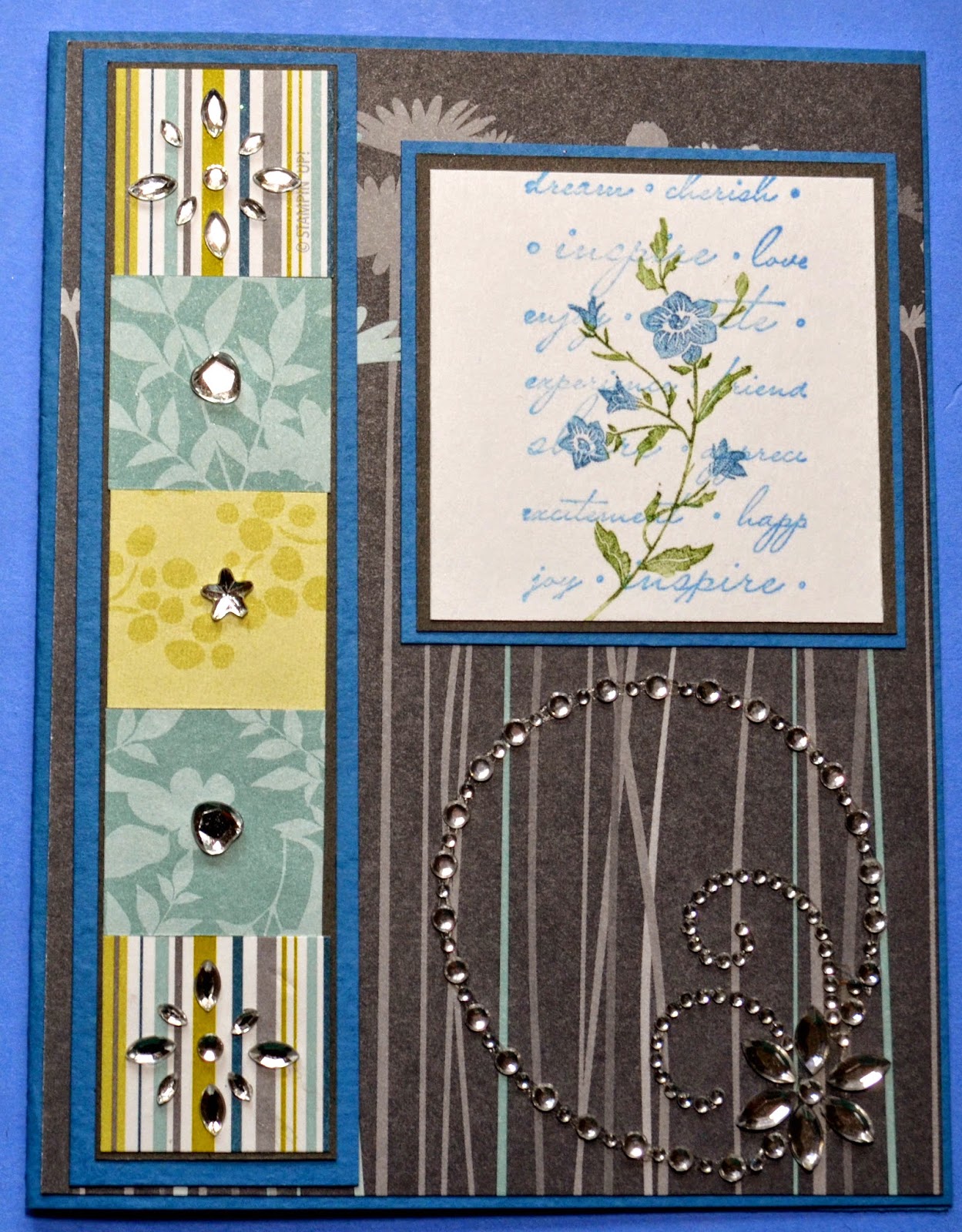
Now for the card of the day. I usually make between ten to twelve cards per week. I don't have a favorite stamp company, but right now it seems like I am mostly working with "Stampin Up". The stamp set that I used to create today's card is called "Charming". I believe it was in last years catalogue.

But, anyway here is today's card;

          "Charming"                                     


The stamp set as I stated is a set from last years " Stampin Up" catalogue called "Charming". It is still available as a digital download. The patterned paper from "Close to my Heart" was out of my stash and was just scraps. The crystals are from a store that was closing down.
 
The flower is a solid stamp that I colored with markers, then huffed on it and stamped. The card I would consider and "All Occasion Card", but it is a good mans card.
 
Well, that's all for today I'll post soon.
 
Have a GREAT DAY!!!! 
 
 
Bob L.


Advantage of Cutting Shapes with the Cricut Explore

Saturday, August 23, 20914

Good Morning everyone. Wishing you and yours a happy weekend.

In my last post I mentioned that I no longer used dies to cut my shapes for cards. Now I use my "Cricut Explore" and the "Cricut Design Space" to cut all of my shapes, such as hexagon, circles, ovals, and squares plus the mats for the shapes.

The "Cricut Explore" is different then the older  "Expression" or the "Expression2". With the "Explore" you do all of your work online. The software is free and from what I have experienced over the past 6 months, works beautifully.

"My Cricut Explore"
 
 
As you will notice, there is no keyboard or screen, that's because as I stated before the software for the "Explore" works and designs on the internet.
 
Here is what the opening screen for the software " Cricut Design Space" looks like.
 
 
"Opening Screen of Cricut Design Space"


The software that you use has quite a few advantages, such as;
 
    1.You are able to import SVG and DFX, JPG, GIF files into the program and cut them. There are  lots of these files on the internet for free.
 
    2. You are able to size your shapes to any size that will fit your card or scrapbook page, then cut you matching mat to leave what ever border you wish. i.e. 1/8", 1/4" or even 1/2"
 
    3. You can link all of your cartridges to your "Design Space" account.
   
    4. You can subscribe for $9.99 a month to use Circuits' image file. There are 25,000 images that you get to use. I do because it keep the cartridge cost in my wallet.
 
I have owned every machine that Provocraft has sold. Honestly this is the only one that I use on a daily basis. By being selective about the cartridges that you purchase, you eliminate the expense of the Spellbinder die.
 
Just as a side point, Provocraft has come out with a new blade for their machines, it is a "German Carbide Blade" that is really sharp and has a way longer cut life.
 
So all in all, I am very satisfied with the Cricut Explore and would highly recommend it.
 
One other point, the Explore has "Bluetooth" capability and works with my Apple Ipad.
 
Have a GREAT DAY!!!!
 
Bob L.


My Awakening

Tuesday, August 19 2014

It has been almost two years since I have posted to my blog. I have no excuse except pure laziness or motivation. Anyway, I have decided to get back with the program of being creative. It's not that I have not been creating  cards or other projects, it is just that I have not been posting them to this blog.

In fact I have been creating 10 to 12 new cards per week.

The company I was demonstrating for, "Close to My Heart" is a good company to demonstrate for, but I got burnt out. So, I would guess you could call me Company Free.

The card I have posted today is from a stamp set from the now defunct company "The Angel Company". A lot of the stamp sets are still available through a company call "Red Rubber Designs". The set used "Good Timber" is not one of the sets that is available.

But, anyway here is the card that I have to offer today.


"Happy Birthday"


The set used , as I said is called "Good Timber", that's where the tree came from sentiment is from a "Close to My Heart" set.
 
I cut the hexagon out on my Cricut Explore to use as a stencil. Now a days I use the Cricut Explore in "Cricut Design Space" instead of with punches or Spellbinder Dies. You ask why? Because I can get my mats exactly the size I need. I sponged the background using the stencil I made. The birds, were drawn in with a pen. The dots used to break up the white space was done using s dot stamp from "Judikins" It's an old stamp but very useful.
 
Well, that's all for today. I'll post again soon.
 
Have a GREAT DAY!!!!!
Bob L.


"Christmas Cardinal"

Wednesday, September 25, 2012

I have become intrigued with a new maker that I have seen advertised in some of the magazines. The markers are called "Spectrum Noir".  They are alcohol based markers that can be blended, and refilled.

These markers are comparatible to the now famos "Copic" markers.

I bought a couple of sets at my local "Joann's" for $14.99 a set of six. With a 50% off coupon that came to about $1.25 for each marker. Not a bad price!!!

I am quit impressed with the results that I was able to obtain with the markers, but I'll let you judge for your self.


"Christmas Cardinal"


The stamp set is from "Close to My Heart". The background paper is from "Joann's". And, the light green leaves where cut on my Cricut.

All in all I think that the Spectrum Noir markers are well worth the money especialy when using acoupon at Joann's. It gives you a good alternative to the pricey "Copic" markers.

If anyone else has had experience with these markers, let me hear from you.

Have a GREAT DAY!!!

Bob L.

"Wonder and Joy"

Saturday, July 14, 2012

It has been a busy week, but I did get to finish up a couple of projects. Mostly at the Thursday card get together.
The card that I am posting today is called "Wonder and Joy". It reminds me of when I was a child and I was always doing something that my mother, who was city raised, thought was icky. But, I thought it was great fun.

So here is the card, and you will see what I was into;

"Wonder and Joy"


The stamp set is a set from the now defunct "The Angel Company". I sold for them for about 12 years until they closed shop. A company called "RedRubberDesigns" bought up most of thier designs.

You will notice that I used another "EK Success 2 in 1" punches for the trim along the bottom of the card. There are I think 5 different punches to be had, at Joann's.

The image was stamped with Memento ink and colored with my Copic markers on "Cryogen Cardstock". The background of the card was stamped using the remainder of the stamps in the set using Versa-Mark ink to stamps the watermarks. A little Stickles was applied to give the card some bling.

Very simple card, but the wife liked it.

Have a GREAT DAY!!!!

Bob L.

"Happy Birthday Card and Product Review"

Wednesday, July 4, 20012

I hope everyone is enjoying thier 4th of July. I surpose to be in the high 90's today, so I believe most of our activities will be inside. Not that I'm against doing a little BarBQ ing.

Todays card is one that we made at our monthly club meeting.

I made a birthday card because everyone needs Birthday cards.Seeing that I'm always late sending out cards, I thought this sentiment was appropriate. And here is your look at the card.

"Happy Birthday"


The stamp set used is from "Close to My Heart" called "Card Chatter-Birthday" # D1475 and the cost is $17.95. The mats wghere cut out using the Spellbinder die set "Label Eight". The front of the card was embossed with a Cuddlebug Embossing frolder called "Birthday". The decoritive strip was cut with an EK Success punch. More about the punch below.

"Product Review of The EK Success 2 in 1 Punch"


The punch is fairly new and  I got this one at Jo-Anns. The cost of the punch is $25.95, but with a 40% off coupon it is very reasonable at $15.57. Here is how the punch looks;

"EK Success 2 in 1 Punch"

The pink lever on the left front on the body of the punch is how you select the type of punch out that you want to do.The lever is currently set to #2 which is the edge punch, and #1 is for the complete cutout to give the strips that I used on the top and bottom of the card.

One note on the use of these punches. The need to be pressed very firmly, in other word they punch hard. In the #2 setting, the punch lever only goes half way down. Thats because it only cuts half the pattern. In the #1 setting the punch must be pressed down hard to get the effect.

"Punch Outs"

The top example is lever setting #1, and the bottom example is using lever setting #2.

The punches come in five(5) different patterns that I have seen so far, but there may be more. You can also cut the #1 pattern in a contasting color and overlay it over the bottom pattern. This gives a great look. Try one you will like them and find many uses for them. They are not only cost effective, but they save space.

That's all for today.

Have a GREAT DAY!!!
Bob L.

"Plant a Seed"

Friday, June 15, 2012

I Know, I Know. I have been away along time. I just went into a funk and my creativity went away. Probably to many other interests. But, I;m finally getting my mojo back.

The first card I'm posting is from a stamp set from "Close to my Heart" called "Friendship Bouquet" # S1205. It was a STOM for the month of May 2012.

Without further delay here is the card for today;

"Plant a Seed"


I used several Spellbinder dies on this one. The mat for the flower and the saying was the "Heart Circle S4-316" and the stamping mat, I use the "Standard Circles". 

The flower was stamped and colored with Copic Marker, then I used the overhang method to cut out with the die.

The top half of the main mat was cit on a diagonal and embossed with a Cuddlebug embossing folder. On the bottom half of the front I used an old dot stamp to give it some dimension.

Well, that's all for today. If you have a question or a comment please contact me. You comments are always welcome.

Have a GREAT DAY!!!
Bob

"Something Different"

Tuesday, February 7, 2012

Todays card is something different for me. All of my regular cards are usually colored images, but todays card is made using my Cricut Imagine. Yes that's right my Cricut Imagine.


I will call the card a "Thank You Tree"


"Thank You Tree"


This is the first time that I have made an entire card with nothing but my Cricut Imagine. One advantage for using the Imagine is that you can use the RGB codes from any paper and duplicate it on the Imagine. Plus, you can match the cardstock colors for most companies such as "Stamp'nUp" or "Close to My Heart". That's a big advantage in card making.


I used one cartridge to make this card called "Ultimate Creative Sampler". This cartridge comes with six different overlay mats. That's alot of images.


The card body was embossed using a Sizzix Embossing Folder then sanded lightly.


Hope you enjoy todays card and will leave a comment.


Have a GREAT DAY!!!


Bob L.

"The Present"

Monday, January 30, 2012

I spent the weekend helping a friend build a new pole barn for all of the equipment he has. Tractors, boats and associated pieces. I love doing this type of work and look forward to it. But, because of my bad knee, I don't do as much of it as I would like.


The card that I am posting today is a card that I made Friday. For this card I used a stamp set from "Close to My Heart" and it is called "The Present" # D1436 and sells for $17.95. Very cute set and I use it quite often. Here is the card;
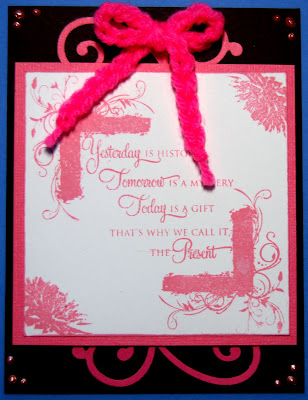


"The Present"


The image on the card uses three images from the set and the images are stamped using the "Blush" ink pad from "Close to My Heart". This ink give a very pale, but pretty color.

I used a Quik-Kutz die to cut out the swirls on the top and bottom of the card on a matching pink card stock. I then added the "Liquid Pearl" dots to the corners of the card.


My wife made the crocheted bow for the top of the card. She is very handy at doing these kind of handcraft items.


Hope you enjoy my efforts and will leave a comment.


Have a GREAT DAY!!!

Bob L.

"Six-Fold Card"

Monday, January 23, 2012


Well it has been a long two months. I can't realy say why I have been so busy, or should I say distracted. But, I have been.

The card and instructions that I have posted today I saw originally on SplitCoast Stampers that was presented by Monique Trappeniers. It took me awhile to get the card right, but I finaly accomplished. So, thanks SplitCoast Stamper and Monique Trappeniers for the inspiration.

The card is appropriately calle a "Six-Fold Card", and you card see why from the pictures.


"Six-Fold Card"


I used this on in a card class that we had last week. Here is what the card looks like when it is opended. Count the folds to see where it gets it's name


"Six-Fold Card Un-Folded"


The card is simply to make once you get the folding and cutting down. The main body of the card is an 8"X12" piece of card stock. The piece of cardstock is scored at 4" and 8" along the 12" side.


Then score the 6" side at 2" and 6".The remaining step is to cut the card out using the score lines. I have inserted a diagram of the cutting sequence below.


Keep your piece of cardstock in the same orientation as the picture above and you should not have any trouble getting it right.


Once you are done cutting and folding the card, the fun is in the decoration of the card it's self.


Give this card a try, you will love the results.


Have a GREAT DAY!!!
Bob L.


"Thinking of You"

Tuesday, November 29, 2011


Well, I made it through Thanksgiving. I gained a few pounds, but who has not. I guess working in my craft room isn't counted as exercise.

Todays card is the second most demanded type of card that my better half asks me for, "Thinking of You". Here is the most recent one I made;


"Thinking of You"


The image used is from a "Close to My Heart" stamp set called "Childhood Portrait" #D1373. You can see the full set here.


As you can see, the image is a silhouette that I stamped using "Chocolate Ink". All of the images in this set are silhouettes. I love the silhouette type stamps because I can use them to make card very quick. No coloring.


My hand is not that steady so I used a 2" square acrylic stamp block placed over my stamped image, and using a "Chocolate Marker" drew dashed lines around the block centered over the image. The sentiment was stamped with " Juniper" ink. The small and large hearts where stamped then cut out.


I curled the upper right and lower left corner of the stamped mat by slightly moistening the paper then rolling them slightly.


The card is very simple and quick to make. I hope you will give it a try.


Have a GREAT DAY!!!

Bob L.


"Happy Thanksgiving"

Friday,November 25, 2011

I hope everyone had a great Thanksgiving. I always look forward to the holidays, because one of my favorite activities is eating. I can realy chow down. Yesterday was no exception.

So in honor of this theme, here is a simple 5"X5" card that I made;


"Life is Good"


The image used is from a stamp set from "Close to My Heart" and is called "Remarkable Wreath" # C1473 and the price is $13.95. If you wish to purchase this stamp set you may do so at my "Close to My Heart" store.


As I stated above the overall measurements for the card is 5"X5". I stamped the image on a 2 3/4" SQ piece of Colonial White piece of cardstock. The wreath was stamped twice, with a slight rotation between and was stamp with a Chocolate ink. The leaves were stamp in Honey ink and the sentiment was stamped in Ponderrosa Pine.


All of the papers used were from "Close to My Heart". I finished off the card with some baker twine and some light green gems.


I hope you enjoy the card and will leave a comment.


Have a GREAT DAY!!!

Bob L.

"St. Nick"

Friday, November 11, 2011

I have been trying to get motivated to finish up my Christmas cards. So today I sat down and worked on one with an image from "Close to My Heart" called "St. Nick"# B1356. In fact I used all of the stamps in the set on the this card.
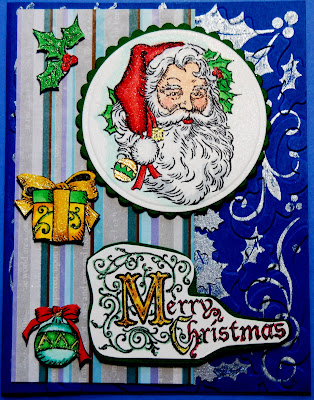

Here is the card;

"St. Nick"

And here is a closeup of the main image "St. Nick";


The images were colored using Copic markers on "Cryogen Iradescent Paper'.That is the sparkle that you see in the image. It is right in the paper and shows through the Copic markers. The colors that I used were;


Hat; R22,R24,R27,R29
Face; E000,E01,R20
Holly; YG05;YG09
Beard; C1


I used Spellbinder dies to cut out the image and the mat. Both dies were from the Petite Circle series. The patterned paper is from a set from "Close to My Heart" called "Wonderland" # X7146B.


The background on the main card was accomplished using one of the new "Hero Arts" stamp and embossing set called "Holly".
To cut out the smaller images, I used my "Glass Mat" and a new xacto knife.


I think it's a very cute card which does not take much time to assemble.


If you have a question about the card or products used, please let me know.


All of your comments are as always appreciated.


Have a GREAT DAY!!!


Bob L.


"Happy Birthday Glitter Ritz"

Sunday, November 6, 2011


Todays card is done with a little different technique. The technique is called "Burnished Velvet".

First I'll show you the card;


"Happy Birthday"


The card it's self is self explanatory. Although the glitter does not show well in the picture, believe me it really glitters when you see it first hand.But, the stamping of the image of the flower is the technique called "Burnished Velvet". To stamp the image I used a "Glue Essentials" Glue pad. The pad looks like a standard ink pad, but with one difference. The glue pad need to have glue applied everytime you use it. It does not require a lot of glue, but needs to be applied each time you use it.


After you apply the glue to the pad, you are ready to stamp you image. Stamp the image on the paper. This is very important wait 15 minutes for the next step.


After the 15 minutes is up, we are going to do the "Burnished Velvet" technique. The product I used here is "Jewel Glitter Ritz" it is a Micro Fine Glitter. The glitter is different in that it has very little excess powder in it. You might as well say it's pure glitter, and it goes a long way.


Once the 15 minute is done, the glitter can be applied. Take a very small amount of glitter and apply it to the image in several places. With your finger and very light pressure rub the glitter into the image. Once the image is completely cover, tap the rest of the glitter off. Using a large makeup brush the rest of the glitter off the image.


The glitter comes in 60 different colors. So, you should be able to find a color to go with your project. This glitter and technique works on both ligh and dark color cardstock.


Give this technique a try, you'll love the effect.


If you have a question, please don't hesitate to ask.


Have a GREAT DAY!!!


Bob L.

"Birthday Criss Cross"

Monday, November 1, 2011

Todays card is called a "Criss Cross Card".Very simple card to make once you do the cutting. I saw the idea on the "Split Coast Stampers" site. Here is where you can get the instructions.


The image is from "Close to My Heart" and the stamp set is called"Enjoy Every Moment" #C1395. The set is from the Spring/Summer 2011 catalog. As you will notice the image is mounted upside down, but that's how the grow on the fence in my yard. And, here is the card;


"Criss Cross Card"


The card was colored with with Copic Markers using the following makers;


Flowers; B00,B01, B04
Leaves; G02, G05


The mats were cut with a Spellbinder die set called "Labels Four". I did sham stiching on the body of the patterned paper with a blue multiliner pen. Some glass half pearls were added to the front of the card.


Very simple card, but I think it turned out alright.


What do you think?


Have a GREAT DAY!!!


Bob L.

"Snow Days"

Saturday, October 29, 2011


I had to get a start on my "Christmas Cards". I only have about twenty (20) made so far, so this one will make 21.
This card is from a "Close to My Heart" stamp set call
"Snow Days". It a cute stamp set as you can see from the link to my store. For this card I used the house. Here is the card I came up with;


"Snow Days"


And here is a better view of the house it's self.


"Close Up"


I cut out the image and the mat using Spellbinder Dies. The patterned paper used was from "Close to My Heart" called "Wonderland" part number X7146B. It has 3 sheets of double sided patterned paper (2 of each) and matching cardstock. Well worth the price of $9.95.

The image was colored with Copic markers.


The snow effect on the image was created with a "Marvy Snow Marker". I like this snow pen alot better than then "Liquid Applique", because the Marvy marker can be heat set after only 15 minutes. The Liquid Applique needs to dry over night.


The snowflakes I used a "Martha Stewart" punch that I cut out of silver paper that I ran through the Cuddlebug with the Swiss Dots embossing folder.


All and all, I am pretty satisfied with the card, but the important thing is what is your opinion?

Have a GREAT DAY!!!

Bob L.

"Beautiful Lily"

Monday,October 17, 2011

It seems like I have gotten off on a flower kick. At least coloring them with my Copic markers. As you all should realize by now Copics is my favorite coloring medium. It is so fast and easy to color with and the color selection is outstanding, over 300 colors.


Today's image is from "Close to My Heart" called "Enjoy Every Moment" CTMH# C1395. It has three (3) stamps in the set, Lilies, Morning Glories, and Daisies. Very versatile set.


And here is today's card;


"Beautiful Lily"


After coloring the image I cut out the mats using a Spellbinder die set "Labels Eight", in different sizes. The two bottom mats where embossed using a Sizzix embossing folder. They were then colored using direct to paper with an ink pad.


A little ink was stippled onto the body of the card. Then I added some "Liquid Pearls" as embelishment.


Hope you like todays card and will leave a comment. All comments are appreciated and posted.


Have a GREAT DAY!!!


Bob L.